


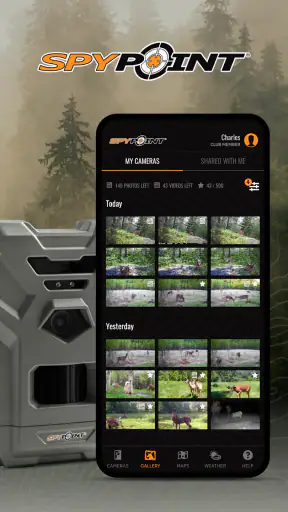
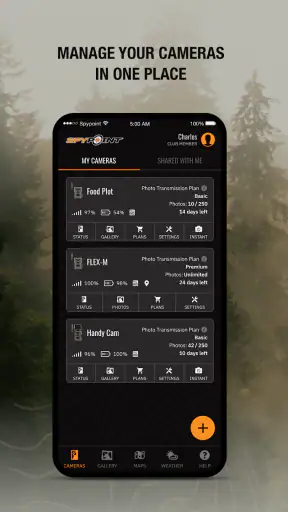
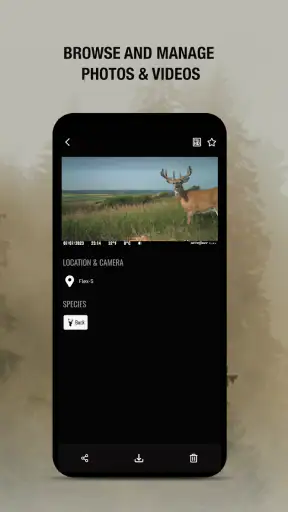
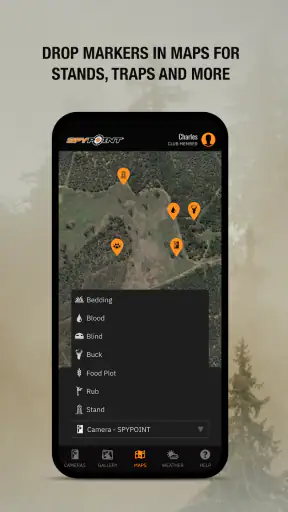
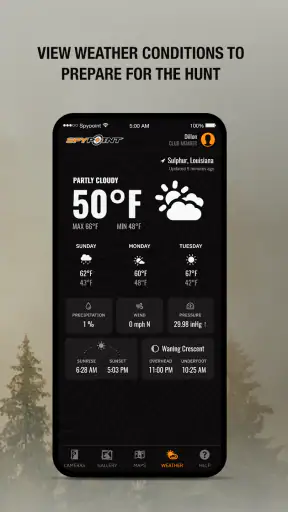
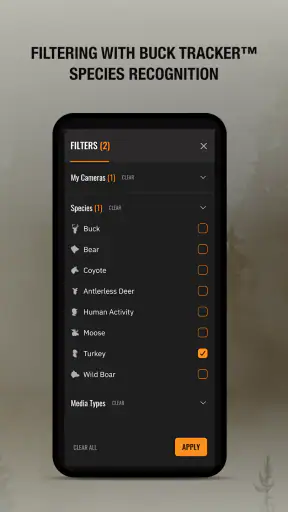
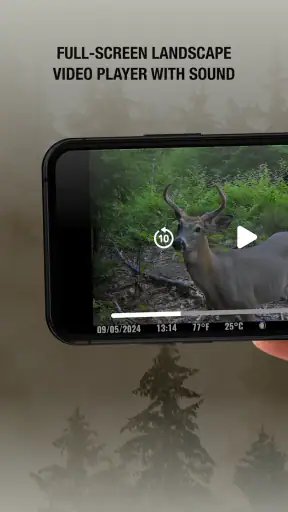
Managing a cellular trail camera sounds simple until you are checking several locations, waiting for images to arrive, and trying to decide whether a quiet day means nothing happened or the equipment needs attention. I found SPYPOINT most useful when I treated it as a remote monitoring tool rather than just a gallery for wildlife photos. It is a free sports app from SPYPOINT for managing compatible SPYPOINT cellular trail cameras and receiving photos and videos, and that focus makes its value depend heavily on how often you use cameras in the field.
My first impression was that the app makes the camera feel less isolated. Instead of visiting every location simply to see whether anything was captured, I could use the phone as the place where incoming media and camera activity came together. That is the main appeal during the first week: the distance between placing a camera and knowing what it has seen becomes much smaller.
From the first week to a lasting outdoor routine
The app has been available since March 4, 2016, and its current version is 5.19.1. That long presence matters because this is not a novelty photo viewer built around one short-lived use. It is part of a broader camera routine: choosing locations, checking incoming material, deciding whether a visit is worthwhile, and keeping track of what is happening between trips.
During the first few days, the most satisfying part is the immediacy of receiving images from a remote camera. A normal trail camera often creates a delayed workflow: place it, leave it, return later, and sort through whatever it recorded. With a cellular model managed through SPYPOINT, the phone becomes a practical checkpoint. I can look for activity without making a trip solely to retrieve a memory card.
That difference is especially useful for someone who monitors private land, hunting areas, wildlife corridors, or property edges. It can also help when a camera is positioned somewhere inconvenient to reach. The app does not remove the need to understand the camera’s placement or limitations, but it changes how quickly I can react to what the camera reports.
The first-week excitement can be misleading, though. New images naturally make any camera system feel more valuable than it may become later. Once the initial curiosity fades, the important question is whether the app saves enough time or improves enough decisions to justify keeping it in my regular routine. In my experience, the answer is yes when the camera is placed with a clear purpose, and much less so when it is installed without a monitoring plan.
What the app is genuinely good at
The strongest use case is remote awareness. If I want to know whether a trail is active, whether animals are visiting a particular area, or whether a camera is producing useful material, receiving photos and videos on the phone is more practical than relying on occasional physical checks. This is not merely a convenience for lazy visits; it can help me decide when a visit has a real reason behind it.
A useful habit is to review incoming media with a question in mind instead of scrolling passively. I look for changes in activity, repeated movement through the same route, or signs that the camera is pointed at an unhelpful angle. That makes the app part of a decision process. It is far more valuable than opening it only when I feel like browsing pictures.
Another non-obvious benefit is that remote viewing can expose placement problems early. A camera may be working perfectly while producing mostly empty frames, blocked views, or images dominated by changing light. Seeing that pattern soon gives me a chance to adjust the physical setup rather than discovering the problem much later. The app cannot correct a poor location, but it can shorten the time before I notice one.
For people who already own compatible cellular trail cameras, the dedicated experience is more direct than trying to combine a separate camera, a generic cloud-storage service, and a messaging workflow. The app is designed around the SPYPOINT equipment relationship, so the value comes from keeping camera management and received media in one place.
Where it fits compared with ordinary trail-camera habits
The usual alternative is a non-cellular trail camera that stores files locally. That approach can be cheaper or simpler in places without a reliable cellular connection, and it avoids the expectation of checking an app. If I only visit a property regularly and do not need updates between visits, a local-storage camera may be the better choice. It asks less of my phone routine and can be perfectly adequate for occasional observation.
SPYPOINT makes more sense when distance, access, or timing matters. A cellular camera paired with the app can reduce unnecessary journeys and provide earlier awareness. The trade-off is that the system becomes a continuing technology habit rather than a device I forget about until the next planned visit. The convenience is real, but it is tied to maintaining the camera and paying attention to what arrives.
I would also avoid choosing this app simply because remote images sound exciting. The app is not a substitute for a camera that suits the terrain, a sensible mounting position, or a realistic monitoring goal. If the location has poor connectivity, if I rarely need updates, or if I dislike checking another stream of notifications and media, the traditional approach may feel calmer and more dependable for my needs.
The month-to-month value comes from decisions, not volume
After the novelty wears off, the app earns its place when it helps me make fewer wasted trips. That is the recurring value I would focus on. A remote image can tell me whether a location deserves attention, whether a camera needs repositioning, or whether a planned visit can wait. Those small decisions add up over a season, particularly when locations are spread out.
The most effective workflow is simple. I check the app at a consistent time, review new photos and videos, separate meaningful activity from routine captures, and note whether anything requires action. The important point is consistency. Without a regular review habit, the app becomes another inbox that fills with media but does not improve what I do outdoors.
I also found that a camera’s usefulness should be judged by the quality of the information it provides, not by the number of files it sends. A busy location may generate plenty of material that says very little. A quiet location may still be worth monitoring if the camera is answering a specific question. SPYPOINT helps deliver the material, but I still have to decide what counts as useful evidence.
For wildlife observation, this can support a longer view. Instead of relying on memory after occasional visits, I can compare what has been arriving over time and recognize whether a location is consistently active or merely had one interesting moment. I would not treat the app as a scientific logging system without building my own careful notes, but it can make repeated observation much easier to sustain.
For property monitoring, the benefit is more immediate. A camera near an access route, gate, or vulnerable boundary can provide awareness between visits. I would still avoid assuming that an app notification replaces physical inspection or a complete security system. Its strength is visual awareness from a compatible trail camera, not an all-purpose answer to every monitoring problem.
Maintenance is the price of remote convenience
The biggest long-term mistake would be to think that cellular access means the camera can be forgotten. The app reduces some travel, but it does not eliminate maintenance. The physical camera still needs sensible placement, a clear field of view, and attention when conditions change. If the lens is obstructed or the camera is aimed poorly, the app will faithfully deliver disappointing results.
My practical advice is to use the first useful images as a setup check. I look at framing, whether the subject area is visible, and whether the camera is capturing the kind of movement I intended to monitor. This is more efficient than waiting for a later visit to discover that the camera has been pointed toward a blank patch of ground.
Battery planning is another part of the routine. Sending photos and videos remotely makes the camera more useful, but it also means I should think about how often it is active and how long I expect it to remain unattended. I would schedule physical checks around the location, season, and activity level rather than assuming that remote access removes the need for them.
The app itself also becomes part of maintenance. I need to keep it available on a supported phone and remember that the current release requires at least OS 10. That is a modest requirement for many users, but it matters if the app is intended for an older device kept in a vehicle or used only for outdoor equipment. Before relying on it, I would make sure the phone I plan to carry can run the current version comfortably.
A useful maintenance trick is to treat every alert or new batch of media as a small status check, not just entertainment. If the pattern suddenly changes, I ask whether the location changed, the camera moved, the view became blocked, or the device needs attention. That mindset turns the app into an early-warning layer for the whole setup.
What can create fatigue over time
The first source of fatigue is media repetition. A camera can produce many similar images, and the excitement of receiving remote photos can quickly become a sorting chore. I recommend deciding in advance what deserves attention. For example, I might focus on new activity, unusual timing, or evidence that the camera’s position needs adjustment instead of studying every nearly identical frame.
The second is the mental pull of checking. Because the app puts remote activity on the phone, it is easy to open it too often and feel disappointed when nothing interesting appears. That is not a technical failure; it is a habit problem. A scheduled review is usually more sustainable than constant checking, especially for locations where activity is naturally irregular.
Connectivity can also shape the experience. A cellular trail-camera app is most compelling when the camera can communicate reliably from its location. If the site is marginal, the promise of immediate awareness becomes less dependable, and the traditional memory-card workflow may feel more predictable. I would evaluate the actual camera location rather than assuming that a phone connection in town tells me anything about the remote site.
Another limitation is that the app cannot make a weak monitoring plan strong. If I place cameras too close together, aim them without a clear objective, or monitor an area that rarely produces useful information, the application may simply make the lack of value more visible. The best results come from pairing the software with deliberate placement and a reason for each camera to exist.
There is also a difference between wanting photos and wanting answers. If my goal is to collect occasional wildlife images, the app can make receiving them enjoyable. If my goal is to understand patterns over many weeks, I need a system for reviewing and recording observations. The app supports the flow of media, but it does not replace my own judgment or organization.
Who should use it, and who should skip it?
I would recommend SPYPOINT to someone who already uses compatible SPYPOINT cellular trail cameras and wants a straightforward way to manage them from a phone. It is particularly well suited to people who monitor locations that are inconvenient to visit, who need earlier awareness of activity, or who want to decide whether a trip is worthwhile before driving out.
It is also a good fit for a patient wildlife observer. The app rewards people who can build a repeatable checking habit and distinguish meaningful patterns from background activity. For that user, the remote delivery of photos and videos is not just a flashy feature; it becomes a practical connection to a location that would otherwise remain unseen between visits.
I would be more cautious if I were buying equipment for a location with unreliable cellular service, if I only checked a camera a few times each year, or if I strongly preferred a low-maintenance setup. In those cases, a conventional trail camera with local storage may be less distracting and easier to understand. Someone looking for a complete home-security platform should also look elsewhere, because this app’s purpose is tightly connected to SPYPOINT cellular trail cameras.
The app is free and carries an Everyone content rating, which makes it approachable for households where several people may view outdoor images. Its audience is still defined more by the camera hardware and outdoor use case than by age. A free download does not mean the overall camera setup has no ongoing considerations, so I would judge the complete system rather than the app in isolation.
My long-term verdict
SPYPOINT earns lasting space on my phone when I have a real remote-monitoring job for it. The first week delivers an immediate sense of connection: images arrive from a place I am not standing in, and I can react without making a needless trip. The longer-term value is quieter but more important. It comes from turning those updates into better decisions about visits, placement, and attention.
Its weaknesses are tied to the same convenience. Remote access encourages frequent checking, creates media to sort, and can make me forget that the physical camera still needs care. If I use the app without a schedule or purpose, the novelty fades into notification fatigue. If I use it as part of a clear routine, it remains useful after the excitement of the first images has passed.
The public response is encouraging, with an average rating of 4.4 from around 55 thousand ratings and more than 1 million installs. I see those figures as signs that the app has found a substantial audience, not as a reason to ignore the practical trade-offs. The important test is whether remote information changes what I do with my cameras.
My final recommendation is therefore conditional but positive: choose it when avoiding unnecessary trips and receiving timely camera media genuinely matter to you. Set up a review habit, use early images to check placement, and keep physical maintenance in the plan. With that approach, SPYPOINT feels less like a novelty gallery and more like a useful part of an outdoor monitoring routine. Without that approach, a simpler local-storage alternative may be the better long-term fit.


